Accounting and software topics covered
Perdisco publishes three computerized practice set titles for Sage 50 at two different
levels of academic difficulty:
- Electronics Specialist
- Electronics Specialist with Data File Download
- Corporate Gift Baskets.
A general overview of the two titles is provided on our
catalog page. The purpose of this page
is to provide more detail for instructors seeking to understand
which title may best suit their teaching. Instructors are encouraged to order
a free review copy of their selected title.
Overview
The titles all require students to use the Sage 50 software to complete a one month
accounting cycle. They are substancial activities that are expected to take
many study hours to complete over multiple days or weeks. Students can bookmark
their current position in the practice set and return to that same place the
next time they are ready.
The following table sets out key differences between the titles:
| |

Sage 50
Practice Set
|
Sage 50
Practice Set
with Data
File Download
|
Sage 50
Simplified
Practice Set
|
| Overview |
| Context |
Student is the accountant in a retail business
that sells consumer electronics
|
Student is the accountant in a retail business
that sells consumer electronics
|
Student is the owner of a one person business selling
gift baskets
|
| Pedagogical focus |
'Assessment'
More words to read, more complexity to manage and less detailed feedback
|
'Assessment'
More words to read, more complexity to manage and less detailed feedback
|
'Learning'
Lots of help with feedback that precisely identifies errors made
|
| Degree of academic difficulty |
Most demanding |
Demanding |
Less demanding |
| Data file set up in Sage 50 |
Set up independently by student |
Downloadable data file, so no set up is required |
Downloadable data file, so no set up is required |
| Time required to complete the practice set |
Up to 10 hours |
Up to 7 hours |
Up to 4 hours |
| Total points available |
419 points |
331 points |
136 points |
Likely grade distribution
(Depends on overall academic level of the class)
|
Lower average with a variance of points in a typical bell curve
|
Lower average with a variance of points in a typical bell curve
|
Skewed towards a higher average with 100% common
|
| Free access to Sage 50 Learning Center |
Included |
Included |
Included |
| Instructor and Student companions |
Included |
Included |
Included |
| Pricing and format
|

$37.75
VirtualTutor Online
|

$37.75
VirtualTutor Online with Data File Download
|
$37.75
VirtualTutor Online with Data File Download
|
Order review copy
(free for instructors) |
Order practice set
|
Order download file
|
Order simplified
|
The accounting cycle
The exact details of the accounting cycle implemented by each title vary. The following
dot points and table are provided to help instructors determine which title
best reflects the accounting topics that they teach in class. In general, during the
process of completing their one month accounting cycle, students will:
- Optionally create and setup data files in Sage 50
- Apply U.S. Generally Accepted Accounting Principles (US GAAP)
- Work on a business that is set up as a corporation (Electronics titles only)
- Use the perpetual inventory system and the weighted average method
- Include sales tax when recording sales transactions
- Record adjusting entries (Electronics titles only)
- Perform a bank reconciliation (Electronics titles only)
- Generate aged receivables and aged payables reports (Electronics titles only)
- Prepare financial statements
- Become familiar with the screens and functionality of Sage 50 set out below.
Please contact us if you would prefer an alternate approach to the accounting cycle (for example, a different
inventory system or the exclusion of tax).
The following table compares the two practice set titles to explain, at a glance,
what accounting topics each contains and how they differ:
| |
Sage 50
Practice Set
|
Sage 50
Practice Set
with Data
File Download
|
Sage 50
Simplified
Practice Set
|
| Coverage of accounting processes and concepts |
| Business structure |
Private non-listed corporation |
Private non-listed corporation |
Sole proprietorship |
| Data file set up in Sage 50 |
Set up independently by student |
Downloadable data file, so no set up is required |
Downloadable data file, so no set up is required |
| Volume of transactions in Sage 50 |
Substantial number required |
Substantial number required |
75% less than in Electronics Specialist |
| Inventory system |
Perpetual inventory system and weighted average method |
Perpetual inventory system and weighted average method |
Perpetual inventory system and weighted average method |
| Sales tax
| Included when recording sales transactions |
Included when recording sales transactions |
Included when recording sales transactions |
| Purchase orders and sales orders |
Included |
Included |
Not included |
| Purchase returns and sales returns |
Included |
Included |
Not included |
| Payroll transactions |
Included |
Included |
Not included |
| Bank deposit tickets |
Included |
Included |
Not included |
| Adjusting entries |
Included |
Included |
Not included |
| Bank reconciliation |
Included |
Included |
Not included |
| Unpresented checks or deposits in transit |
Included |
Included |
Not included |
| Bank service charges, interested received |
Included |
Included |
Not included |
| Financial reporting |
Included |
Included |
Simplified |
| Aged receivables and aged payables |
Included |
Included |
Not included |
Sage 50 software functionality being tested
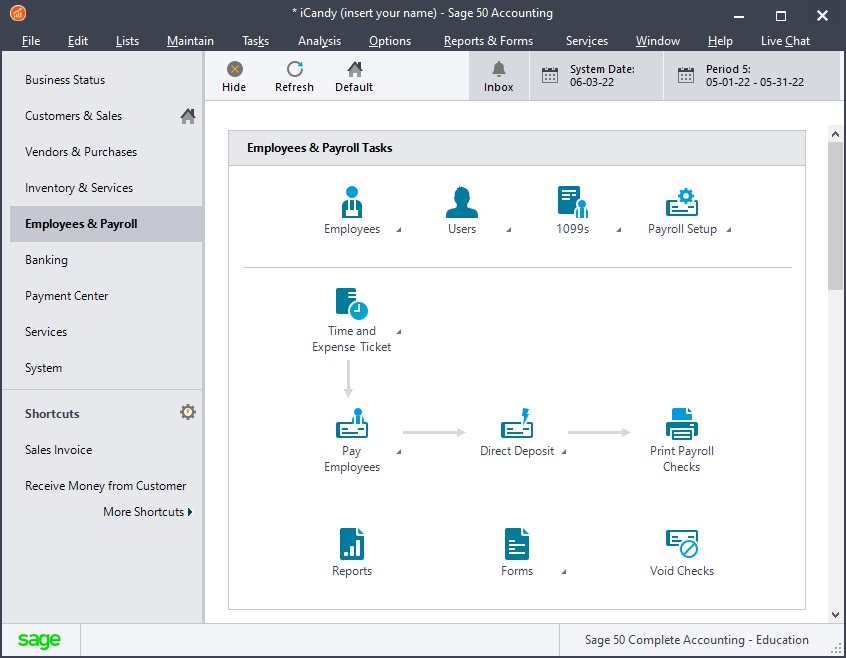
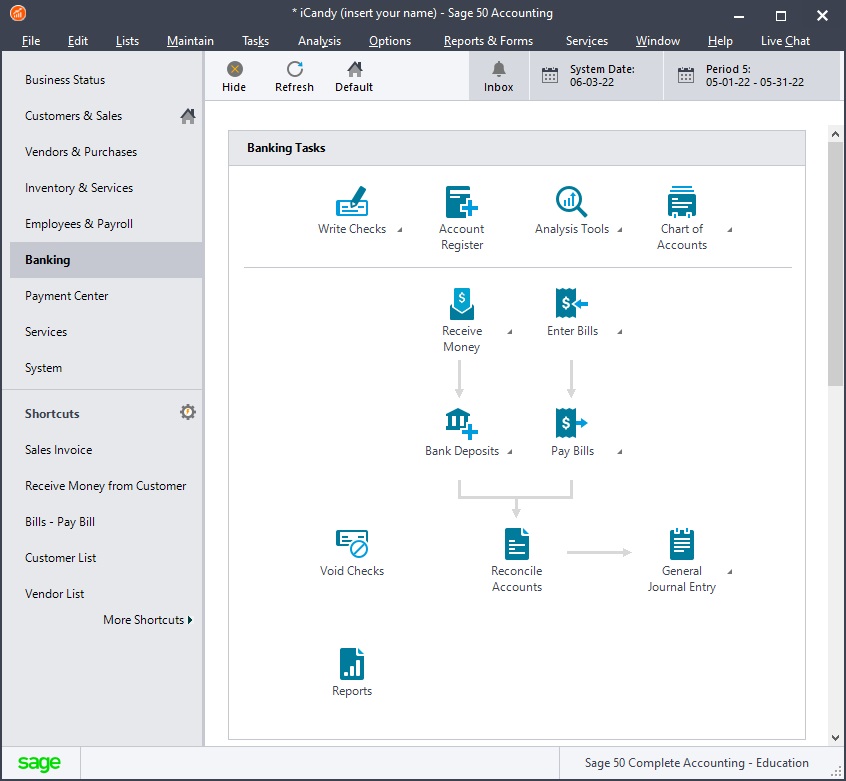
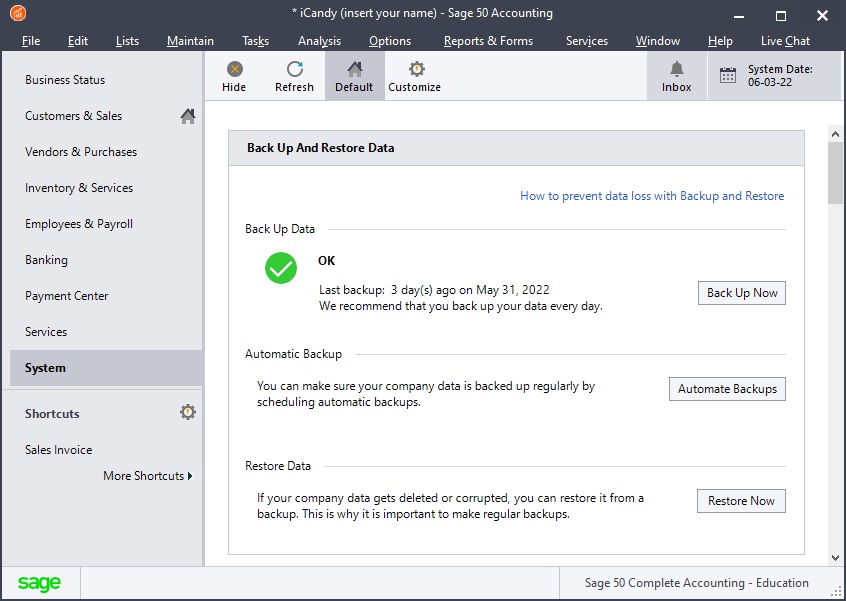
Sage 50 offers different navigation paths to reach its functions. Both practice set titles focus on
the icon-based Navigation Centers of Sage 50 Complete Accounting and ask students to
interact with those icons to achieve the required tasks.
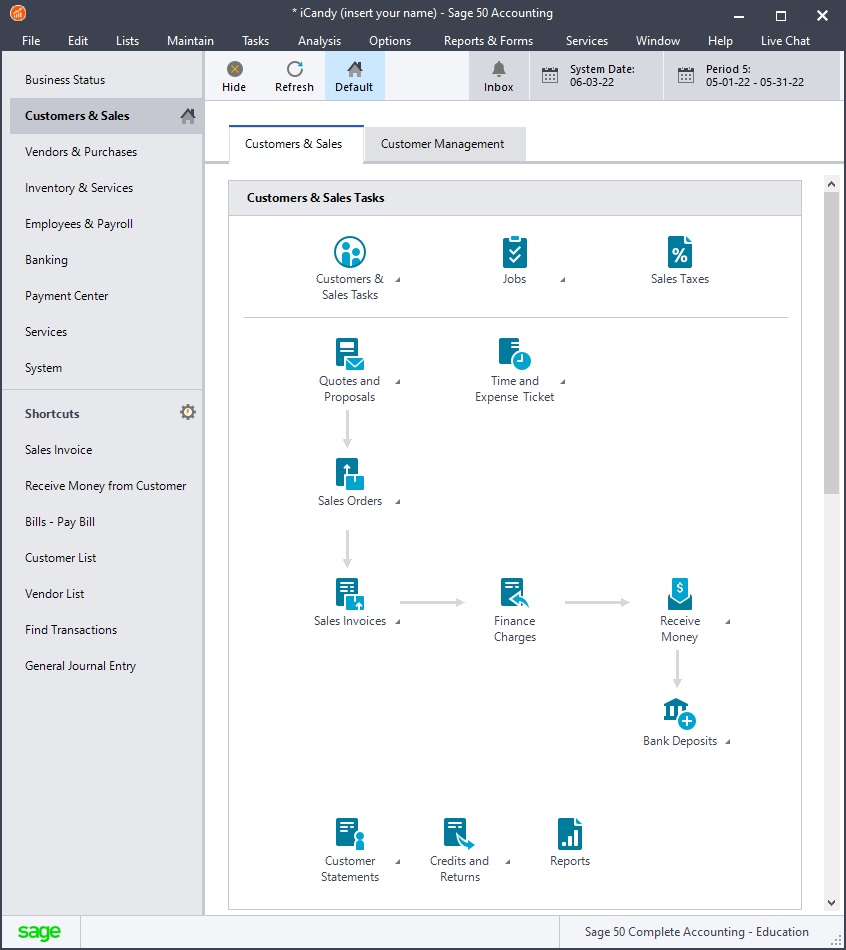
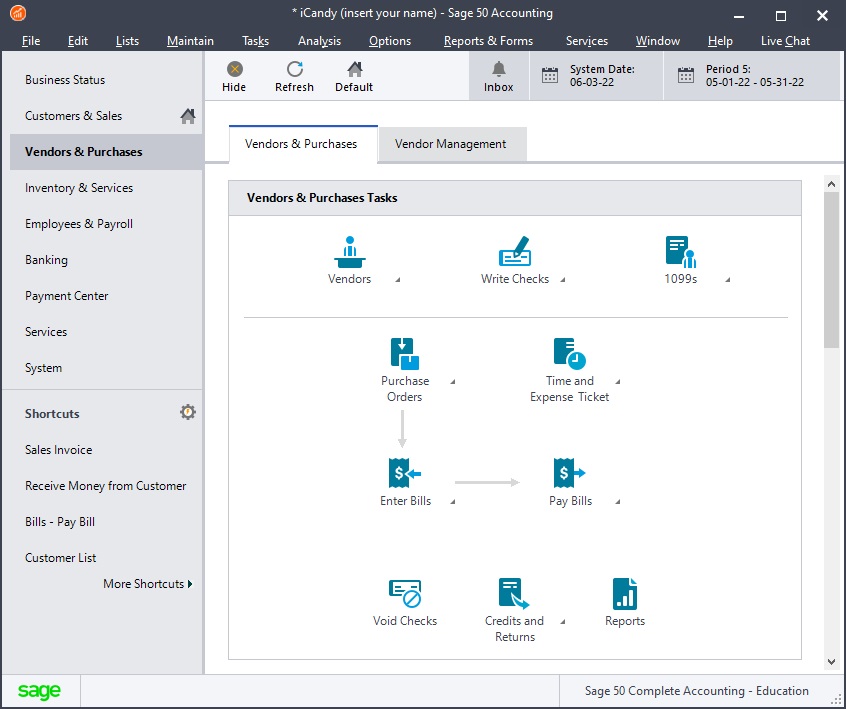
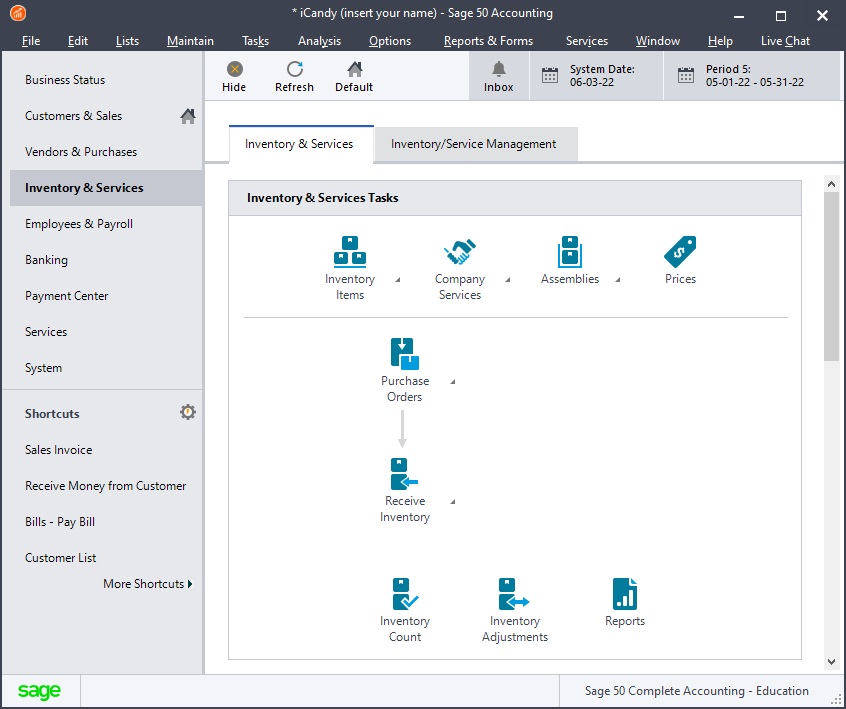
A screen shot of each Navigation Center (taken from the 2013 version of the software) is shown below
to illustrate the concept along with the icons and tasks being tested, where:
 = Students use,
and are tested on, the functionality of this icon
= Students use,
and are tested on, the functionality of this icon
 = Not
included in this practice set title
= Not
included in this practice set title
| |
Sage 50
Simplified Practice Set |
|
| |
Sage 50 Practice Set
with Data File Download |
|
|
| |
Sage 50
Practice Set |
|
|
|
| Navigation Center |
Icon/Task |
|
|
|
Customers & Sales Navigation Center
 |
Customers |
|
|
|
| Jobs |
|
|
|
| Sales Taxes |
|
|
|
| Time and Expense Tickets |
|
|
|
| Quotes and Proposals |
|
|
|
| Sales Orders |
|
|
|
| Sales Invoices |
|
|
|
| Finance Charges |
|
|
|
| Receive Money |
|
|
|
| Bank Deposits |
|
|
|
| Customer Statements |
|
|
|
| Credits and Returns |
|
|
|
| Reports |
|
|
|
Vendors & Purchases Navigation Center
 |
Vendors |
|
|
|
| Write Checks |
|
|
|
| 1099s |
|
|
|
| Time and Expense Tickets |
|
|
|
| Purchase Orders |
|
|
|
| Enter Bills |
|
|
|
| Pay Bills |
|
|
|
| Electronic Bill Pay |
|
|
|
| Void Checks |
|
|
|
| Credit and Returns |
|
|
|
| Reports |
|
|
|
Inventory & Services Navigation Center
 |
Inventory Items |
|
|
|
| Company Services |
|
|
|
| Assemblies |
|
|
|
| Prices |
|
|
|
| Purchase Orders |
|
|
|
| Receive Inventory |
|
|
|
| Ship Packages |
|
|
|
| Track Packages |
|
|
|
| Inventory Count |
|
|
|
| Inventory Adjustments |
|
|
|
| Reports |
|
|
|
Employees & Payroll Navigation Center
 |
Employees |
|
|
|
| Users |
|
|
|
| 1099s |
|
|
|
| Payroll Setup |
|
|
|
| Time and Expense Tickets |
|
|
|
| Pay Employees |
|
|
|
| Direct Deposit |
|
|
|
| Print Payroll Checks |
|
|
|
| Reports |
|
|
|
| Forms |
|
|
|
| Void Checks |
|
|
|
Banking Navigation Center
 |
Write Checks |
|
|
|
| Account Register |
|
|
|
| Analysis Tools |
|
|
|
| Chart of Accounts |
|
|
|
| Receive Money |
|
|
|
| Bank Deposits |
|
|
|
| Enter Bills |
|
|
|
| Pay Bills |
|
|
|
| Electronic Bill Pay |
|
|
|
| Void Checks |
|
|
|
| Reconcile Accounts |
|
|
|
| General Journal Entry |
|
|
|
| Reports |
|
|
|
System Navigation Center and other functions
 |
Backup Data |
|
|
|
Automatic Backup |
|
|
|
Restore Data |
|
|
|
Customer List |
|
|
|
| Vendor List |
|
|
|
| Find Transactions |
|
|
|
| General Journal Entry |
|
|
|
| Chart of Accounts |
|
|
|
| Analysis Tools |
|
|
|
| Check for Sage 50 Updates |
|
|
|
| Year End Wizard |
|
|
|

Please download our
Title Overview
as a PDF brochure for a detailed comparision of the three titles in an easy-to-print format.
This PDF contains most of the detail set out on this page.
Sage 50 software download
Students will need access to 'Sage 50 Complete Accounting' to make use of our Sage 50
practice sets. Sage 50 is the new name for the accounting software that used to be called
Peachtree. Sage 50 is a popular accounting software package used extensively by small and
medium businesses throughout the United States. Most instructors would already be aware that
Sage 50 is a third-party software application written by Sage Software. Perdisco does not write
the Sage 50 software ourselves and is not associated with Sage Software in any way. Rather,
Perdisco is a publisher who creates learning resources for accounting instructors to use in their
classes to teach the Sage 50 software and/or Accounting Information Systems in general.
All of our Sage 50 practice sets automatically
include a student license to use the Sage 50 software. Students are free to download the
included student copy of Sage 50 or access the software through other means such as site licenses
in campus computer labs or existing copies at home or work.
A student license provides a fully functional copy of the software with a 14 month time limit.
A student license requires that it be used by a full or part time student
or faculty member for their own study-related (non-commercial) purposes.
Sage Software does not offer support services under the student license of its
software but students are free to use the public knowledge base resources
provided by Sage Software on its website as well as the free Learning Center provided by Perdisco.
Please note that while Perdisco's practice sets can be used on both Windows and Macintosh
computer systems, the Sage 50 software can only be used on Windows-based computers.
This is a limitation imposed by Sage Software, not Perdisco. Instructors should be aware that
Sage 50 only works on Microsoft Windows and the possible implications this may have for some of
their students before prescribing its use.
How to adopt
Adopting a Perdisco practice set is like adopting one from any other publisher.
We'll help you select the best resource and send you and your teaching team free online and
review copies. You can review our sets yourself, or we can guide you through a
review and demonstration.
Our practice set titles have been designed so that they can be used together or independently.
If you feel multiple titles may be suitable for the same cohort of students, then it is possible
to use (say) the simplified practice set as an introductory learning
activity and one of the full Sage 50 practice sets as a more rigorous assessment activity.
Contact us to start adopting, find out more or to order a review copy.